Adjustable Aluminum Stand for iPhone & iPad (Apple)
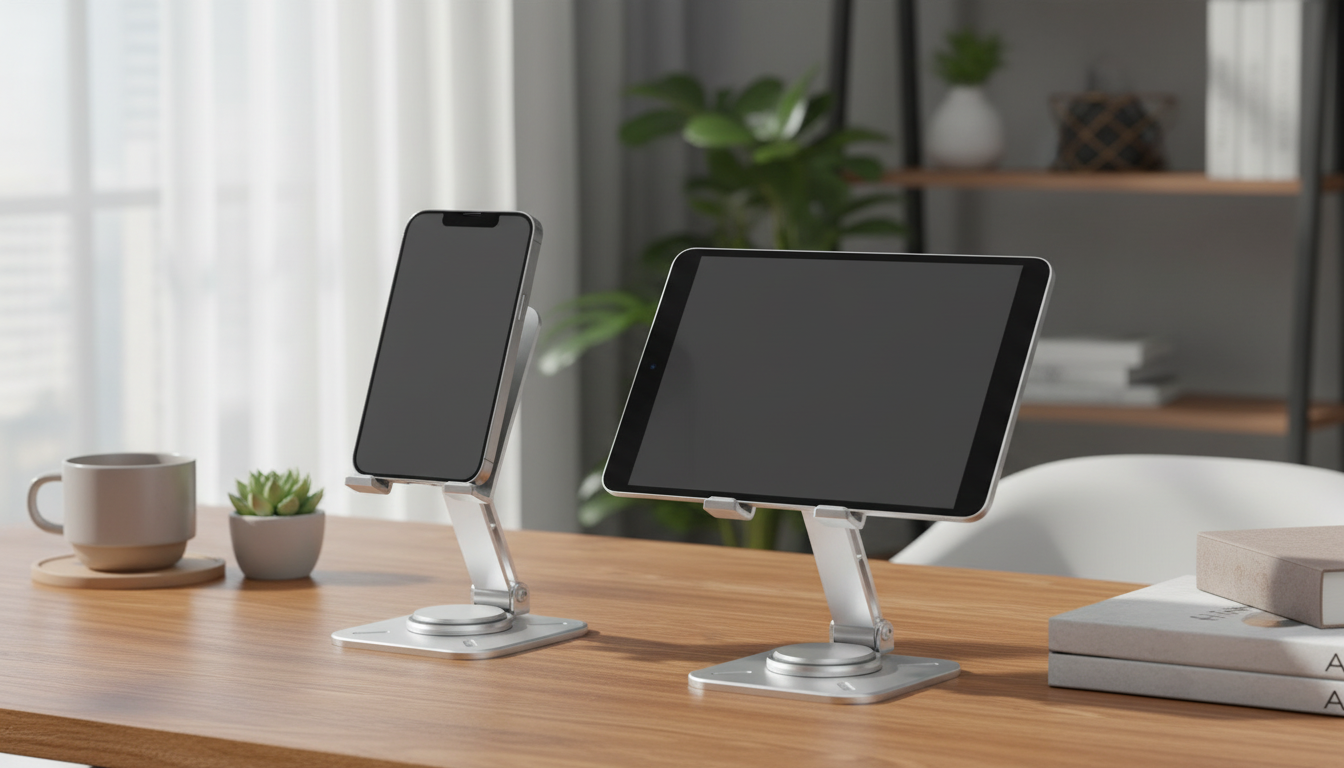
Adjustable Aluminum Phone & Tablet Holder for Apple Devices
A stable stand can make everyday Apple use more comfortable—whether it’s taking FaceTime calls, reading recipes, drawing on an iPad, or keeping an iPhone visible for notifications. This adjustable aluminum holder is built for secure support, flexible viewing angles, and a clean look that fits a desk, nightstand, or kitchen counter without feeling bulky.
What This Holder Helps With Day to Day
Apple devices do a lot of “little jobs” throughout the day, and those small moments add up. A dedicated stand keeps your screen easy to see and tap—without stacking books, leaning a phone against a mug, or laying an iPad flat on the counter.
- Keeps iPhone or iPad at eye level to reduce neck bending during calls and streaming
- Improves desk workflow for calendars, reminders, music controls, and timers
- Makes Apple ecosystem features easier to use hands-free (FaceTime, iMessage, StandBy, Sidecar as a reference screen)
- Works well for charging visibility—keeping the screen readable while a cable is connected
- Useful in the kitchen for recipes and timers without laying a device flat on the counter
For iPhone users, Apple’s StandBy mode is designed to be used while charging in a landscape orientation, which is far more practical with a stable holder than a makeshift prop. Learn more from Apple Support — Use StandBy on iPhone.
Design and Build: Aluminum Stability with a Minimal Footprint
Aluminum stands are popular for a reason: they add weight and rigidity where it matters. That extra mass helps reduce wobble when you tap play/pause, type short replies, or scroll through a recipe with slightly messy hands.
- Aluminum body helps add weight and rigidity for steadier tapping and swiping
- A compact base can fit between keyboard, trackpad, and external monitor stands
- Clean metallic finish pairs naturally with common Apple device colors and desk accessories
- Look for device-contact surfaces that are smooth or padded to avoid scuffs on cases and edges
- A well-balanced stand should feel planted when using a tablet in landscape mode
If you’re building a cleaner work zone, consider pairing your desk setup with small accessory upgrades like Gold Metal Decorative Ring Charms for Apple Watch Bands for a coordinated everyday-carry look.
Adjustability That Matters: Angle, Height, and Portrait/Landscape
Adjustability isn’t just a “nice to have.” The right angle changes how your shoulders, wrists, and neck feel after a long call or a study session. Ergonomics guidance commonly emphasizes keeping screens positioned to reduce awkward head and neck posture; a stand helps you get closer to that ideal, especially when working from a laptop-only setup. For a practical overview, see OSHA — Computer Workstations eTool (Ergonomics).
- Angle changes support different activities: upright for FaceTime, lower for drawing/notes, mid-angle for reading
- Portrait orientation works for scrolling and messaging; landscape works for video, keyboard use, and presentations
- Smooth hinge movement should hold position without drifting after repeated adjustments
- For Apple Pencil use, a lower angle can improve wrist comfort and stability
- For bedside use, a slightly elevated angle can keep the screen visible without glare from overhead lights
Common viewing setups and when they help
| Setup | Best for | Quick tip |
|---|---|---|
| Upright portrait | FaceTime, notifications, reading messages | Keep the camera near eye level for a more natural call angle |
| Upright landscape | Streaming, slides, external keyboard use | Place the stand behind the keyboard for better screen distance |
| Mid-angle | Web browsing, recipes, study notes | Reduce glare by slightly tilting away from overhead light |
| Low angle | Sketching, note-taking, marking PDFs | Use a desk mat for extra friction if pressing firmly |
Fit and Compatibility: Apple Devices, Cases, and Charging
Compatibility is less about brand names and more about the stand’s contact points: the support lip, the backrest, and cable clearance. A well-designed holder keeps the device centered so it doesn’t feel “top heavy” when you tap the screen.
- Works best when the support lip is deep enough to hold an iPhone or iPad securely without blocking the screen
- Case-friendly use depends on thickness; slim to moderate cases typically fit most stand cradles
- If using a charging cable, confirm there’s clearance so the connector isn’t forced upward or bent
- For iPads, stability improves when the stand’s base is wide enough to counterbalance the larger screen
- For iPhones with larger camera bumps, ensure the back support doesn’t press awkwardly against the camera area
iPad users who like to keep a second screen nearby can also use an iPad as a companion display with a Mac; a stand makes it easier to keep that reference screen at a readable angle. Details are available at Apple Support — Use Sidecar with your iPad.
Where It Shines: Desk, Nightstand, Kitchen, and Travel
For a practical, everyday option, see the Adjustable Aluminum Phone & Tablet Holder for Apple Devices. And if you’re putting together a desk that feels more inviting after hours, the Luminous Wooden LED Light Globe 3D Puzzle Model Kit adds a warm ambient glow once your screens are done for the day.
Setup Tips for a Safer, More Comfortable Screen Position
Care and Longevity
FAQ
Will it work with an iPhone or iPad in a case?
Many cases fit without issues, especially slim to moderate styles. Very thick rugged cases may not sit fully in the cradle, so check that the device rests securely on the support lip without wobbling.
Can it be used while charging?
Yes, as long as the stand design leaves clearance for the cable and connector. Avoid sharp bends at the plug and make sure the connector isn’t being pushed upward or held under constant strain.
Is it stable enough for tapping and video calls?
Aluminum construction and a balanced base typically provide solid stability for everyday tapping and FaceTime framing. For larger tablets, place it on a flat, non-slip surface and use a moderate angle to reduce leverage and movement.











Leave a comment